Interior Photographers: Cut Your Retouching Time by 10x (Without Faking Your Shot)
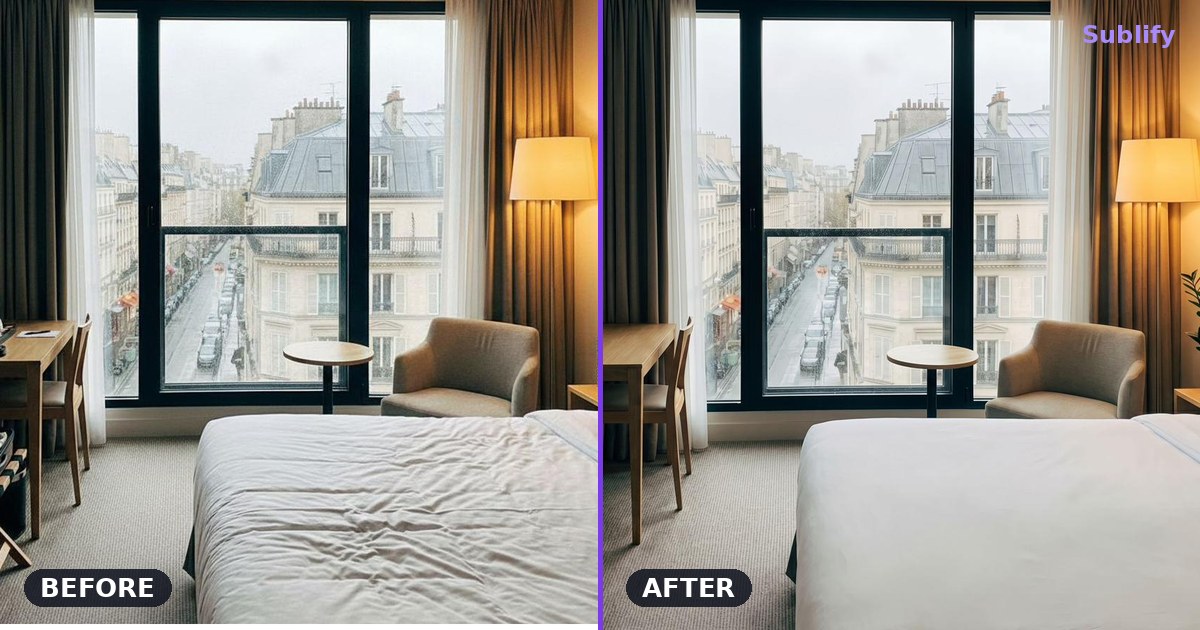
You're shooting a hotel: 80 rooms, 200 photos to deliver. You already know what's waiting for you once you're home. It isn't the shoot that's going to cost you your weekend. It's the retouching.
Smoothing a wrinkled sheet. Erasing an ugly power outlet. Cleaning a mark on the floor. Removing a stray cable, a remote left on the nightstand. Multiplied by 200. That part, invisible to the client but very real for you, can take up half your working time on a shoot.
The good news: this is exactly the kind of repetitive task that AI now handles in seconds. Not to replace your eye or your lighting, but to take the after-the-fact chore off your hands.
Interior retouching, the invisible work
Any experienced interior or real estate photographer knows it: the photo is won at the shoot, but it's finished in post. Framing, light, composition, that's your craft, your value. Nobody will replace that.
But between the raw file and the delivered photo, there's a long list of tedious little fixes:
- Smoothing bedding, flattening a bedspread
- Cleaning a floor (reflections, marks, dust)
- Removing unwanted objects (cables, outlets, signs, your reflection in a mirror)
- Evening out a surface, erasing a wall defect
- Deleting a stray element lingering in the frame
None of these tasks calls on your creative talent. They just take time, patience and Photoshop skills. Easily ten to twenty minutes per photo once there are several fixes. On a 20-photo property, that's half a day. On a hotel, it's several days.
What AI does well (and what it must not do)
Artificial intelligence is now excellent at exactly these repetitive, localized tasks. Where you'd spend fifteen minutes removing an object and rebuilding the background with the clone tool, a tool like Sublify does it in about thirty seconds.
But here's the heart of the matter: everything depends on what the AI is allowed to do. There are two very different philosophies.
Creative home staging furnishes an empty room, changes the decor style, invents a sofa that doesn't exist. Useful for a private individual picturing a space, but a problem for a professional: it no longer matches the reality of the place.
Faithful retouching doesn't touch the structure of your image. It cleans, smooths, removes stray elements, but it doesn't furnish, invent, or distort perspective. The result stays your photo, simply rid of its flaws.
For a professional photographer, only the second approach is acceptable. Your reputation rests on the fidelity of your images: a buyer or client who sees the place in person must never be disappointed. Retouching that deceives comes back to bite you.
Your job is to capture the place at its best, not to invent a different one. The right AI respects that line.
The math that changes your week
Let's lay out the numbers, without exaggerating. Picture a 25-photo shoot, with an average of two or three fixes per image (an object to remove, a sheet to smooth, a floor to clean).
| By hand (Photoshop) | Faithful AI retouching | |
|---|---|---|
| Time per photo | 12 to 15 min | ~30 seconds |
| 25-photo shoot | 5 to 6 hours | a few minutes |
| On a hotel (200 photos) | several days | a fraction of the time |
The time you reclaim is yours: take on one more shoot that week, deliver faster than your competitors, or simply get your evenings back. At volume, the gain is significant, and it lands straight in your margin, since you bill per job, not per hour spent behind the screen.
How it fits your workflow
The idea isn't to replace Lightroom or Capture One. Your flow stays the same: import, cull, color grade, develop. The AI steps in at one precise stage, cleaning up stray elements, right where you used to spend the most time with the clone and healing tools.
In practice: you export your developed photo, run it through the tool for faithful cleanup (objects, sheets, floor, defects), get the result back, and add it to your delivery. One more tool in your kit, alongside the ones you already use.
Let's be honest: the limits
No tool is magic, and a good photographer knows when automation reaches its limits:
- On a very complex scene (busy patterns, tricky geometry behind the object you're removing), a check, or even a manual finish, is sometimes still needed.
- AI handles the repetitive and localized very well, but it will never replace real art direction or a deliberate lighting choice.
- For the very high end, you'll always keep your hand on the finishing touches that make your signature.
The goal isn't to delegate everything. It's to delegate what has no added value for you, so you can focus your time where your talent makes the difference.
In short
Interior and real estate retouching is invisible work that eats your time without showcasing your skill. Smoothing sheets, cleaning a floor, removing unwanted objects: all tasks that a faithful AI does in seconds, without touching the reality of your shot.
You stay the photographer. The AI just handles the after-the-fact chore.
Read next
Best AI Tool for Airbnb and Hotel Photos in 2026
A comparison of 6 AI tools to edit and stage interior photos for Airbnb rentals and hotels, based on their features and pricing.
Read article
AI photo editing for real estate and hotel listings
Practical answers on AI photo editing for real estate and hospitality: brightness, virtual staging, hotel rooms, and alternatives to a photographer.
Read article
Automatically editing real estate listing photos: 2026 comparison
2026 comparison of AI tools for editing real estate listing photos: Gepetto, Pedra, IACrea, Nodalview, Sublify. Features, pricing, and use cases.
Read article